
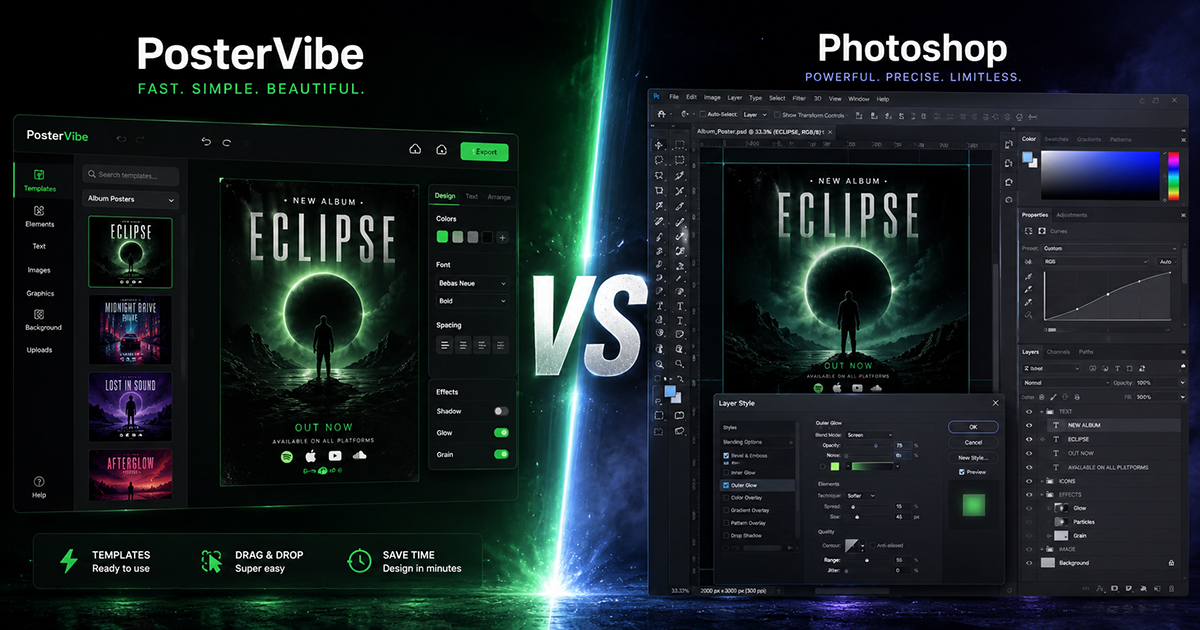
PosterVibe vs. Photoshop: Which Is Better for Album Posters?
Photoshop has been the gold standard of digital design for over 30 years. If you want to make something — anything — look professional, the conventional wisdom says: open Photoshop.
But conventional wisdom doesn't always hold up. Especially when the task is specific, and especially when a purpose-built tool exists that does that specific task significantly faster, cheaper, and with less friction.
Making album posters is one of those cases.
This article is an honest comparison. We'll look at both tools across six dimensions: cost, speed, ease of use, output quality, print readiness, and who each tool is actually built for. By the end, you'll know exactly which one to use — and when.
A Quick Overview
Adobe Photoshop is a professional-grade raster image editor used by photographers, graphic designers, digital artists, and visual effects studios worldwide. It's extraordinarily powerful, with capabilities that extend far beyond poster-making into photo retouching, compositing, digital painting, and more.
PosterVibe is a purpose-built album poster generator. You search for an album, it pulls the cover art and metadata from Spotify automatically, you pick a template, customize it, and export. That's the entire product.
They're solving different problems. The comparison is useful precisely because so many people instinctively reach for Photoshop when a simpler tool would serve them better.
1. Cost
Photoshop
Adobe Photoshop is available through Adobe Creative Cloud. As of 2024:
- Photography Plan (Photoshop + Lightroom): ~$9.99/month
- Single App Plan (Photoshop only): ~$20.99/month
- All Apps Plan (full Creative Cloud): ~$54.99/month
There is no free version of Photoshop. Adobe offers a 7-day free trial, after which a subscription is required.
PosterVibe
- Free Plan: $0 — 10 projects, export at 72 DPI, no watermark
- Basic Plan: $8.99/month — 50 projects, 150 DPI, all templates
- Pro Plan: $16.99/month — unlimited projects, 300 DPI, CMYK, PDF
Winner: PosterVibe
For album poster creation specifically, PosterVibe's free plan covers most casual use cases. Even the Pro plan at $16.99/month is less than Photoshop's entry-level subscription, and it's purpose-built for exactly this task.
2. Speed
Photoshop
To make an album poster in Photoshop, here's what you're looking at:
- Source the album cover at high resolution (rights, anyone?)
- Create a new document at the right dimensions
- Place the album art and resize it
- Manually type the artist name, album title, release year, and tracklist
- Design the layout from scratch — or find and install a template
- Handle font pairing and color choices
- Export with the right settings
For an experienced Photoshop user who already has a layout in mind, this is probably 30–60 minutes minimum. For someone learning as they go, add several hours. And that's before any revisions.
PosterVibe
- Search the album name
- Pick a template
- Customize if desired
- Export
Total time: under 5 minutes. The album metadata — cover art, artist, title, tracklist, label, year — is pulled automatically from Spotify. There's nothing to manually source or type.
Winner: PosterVibe — by a wide margin
The speed difference isn't about cutting corners. PosterVibe eliminates the parts of the process that aren't creative decisions: finding assets, typing data, setting up the document. What's left is the actual design work.
3. Ease of Use
Photoshop
Photoshop has one of the steepest learning curves in consumer software. Adobe has invested heavily in making it more accessible over the years, but the application is still fundamentally designed for professional use. Features like layer management, blend modes, adjustment layers, smart objects, and color spaces require deliberate learning.
According to various estimates, becoming genuinely productive in Photoshop takes 20–40 hours of practice. Mastery takes years.
For someone who already knows Photoshop, this is a non-issue. For someone who doesn't, the learning investment is significant — and probably unjustifiable for the sole purpose of making an album poster.
PosterVibe
The interface is designed for people who are not designers. If you can type an album name and click a template thumbnail, you can use PosterVibe. The controls that exist — font size, color, position — are exposed through a simple panel on the right side. Everything else is handled automatically.
There is no layer management, no blend modes, no color space configuration. This is by design.
Winner: PosterVibe
Unless you already know Photoshop, the learning curve makes it the wrong choice for a specific, contained task like album poster design.
4. Creative Control and Flexibility
This is where Photoshop wins — and it's not close.
Photoshop
With Photoshop, you have unlimited creative control:
- Custom brushes, textures, and gradients
- Pixel-level editing of any element
- Complex photo manipulation and retouching
- Custom typography with advanced OpenType features
- Any blend mode, any layer effect, any compositing technique
- Integration with Illustrator for vector elements
If you can imagine it, you can build it in Photoshop. The only limit is your skill and time.
PosterVibe
PosterVibe works within a template-based system. You can customize fonts, colors, text, sizes, and layout — but you're working with the building blocks the templates provide. You can't paint directly on the canvas, apply photographic filters to the album art, or build a fully custom layout from scratch.
For most album poster use cases — a poster for your bedroom wall, a social media post, a gift — the creative range of PosterVibe is more than sufficient. But for a professional commission with specific artistic requirements, it may not be enough.
Winner: Photoshop
If you need pixel-level control or a fully custom design, Photoshop is the right tool. PosterVibe offers what most people actually need, not everything that's theoretically possible.
5. Output Quality and Print Readiness
Photoshop
Photoshop can produce output at any resolution, in any color mode (RGB, CMYK, LAB), with full control over compression, bit depth, and color profiles. For professional print production, it remains the industry standard. A Photoshop file can be handed directly to a print shop and will meet any specification they require.
PosterVibe
- Free plan: 72 DPI, JPEG/PNG/PDF
- Basic plan: 150 DPI, JPEG/PNG/PDF
- Pro plan: 300 DPI, JPEG/PNG/PDF, CMYK, bleed marks
At 300 DPI with CMYK support, PosterVibe's Pro export meets professional print shop requirements for most standard poster sizes (up to A1/24×36 inches). For the vast majority of album poster projects — home printing, local print shops, online services — this is more than adequate.
Winner: Tie (for most use cases) / Photoshop (for professional production)
At 300 DPI with CMYK, PosterVibe's output is genuinely print-ready for standard use. Professional print production at very large formats or with specialized requirements still favors Photoshop.
6. Album-Specific Features
This category doesn't exist in a standard tool comparison, but it's arguably the most important one for this specific use case.
Photoshop
Photoshop has no album-specific features. It doesn't know what Spotify is. It can't look up a tracklist. It doesn't understand what an album poster should contain or how the elements should be arranged. Everything must be done manually.
PosterVibe
PosterVibe is built entirely around album posters:
- Spotify + MusicBrainz integration: Every piece of album data — cover art, title, artist, release year, label, tracklist, even color palette extracted from the cover — is pulled automatically
- Album-optimized templates: Every template is designed with album poster conventions in mind — proportions, hierarchy, the relationship between cover art and text
- Tracklist formatting: Multi-column tracklist layout, automatic line balancing, font scaling for long albums — all handled automatically
- Community gallery: Browse 50,000+ user-created album posters for inspiration, with real album data
Winner: PosterVibe — uncontested
Side-by-Side Summary
| PosterVibe | Photoshop | |
|---|---|---|
| Starting price | Free | ~$20.99/month |
| Time to first poster | Under 5 minutes | 30–60+ minutes |
| Learning curve | Minimal | Steep |
| Album data (auto-fill) | ✅ Spotify + MusicBrainz | ❌ Manual only |
| Templates included | ✅ 100+ album-specific | ❌ None included |
| Max resolution | 300 DPI (Pro) | Unlimited |
| CMYK support | ✅ Pro plan | ✅ All plans |
| Custom design freedom | Limited | Unlimited |
| Print-ready output | ✅ Pro plan | ✅ All plans |
| Best for | Music lovers, quick projects | Professional designers |
So Which Should You Use?
Use PosterVibe if:
- You want to make an album poster for your room, a gift, or social media
- You don't have design experience (or don't want to use it for this)
- You value your time and want a result in minutes, not hours
- You don't already have an Adobe Creative Cloud subscription
- You want album data filled in automatically without hunting for assets
Use Photoshop if:
- You're a professional designer working on a commission with specific artistic requirements
- You need capabilities beyond poster-making — photo editing, compositing, illustration
- You already pay for Adobe Creative Cloud and are comfortable in the application
- You need complete pixel-level creative control over the final output
The Real Question
Here's the thing about this comparison: most people asking "should I use Photoshop to make an album poster?" are not professional designers weighing up their production pipeline. They're music fans who want a poster of their favorite album on their wall without spending a weekend learning software.
For that person, Photoshop is the wrong answer — not because it can't do the job, but because it's far more tool than the job requires. Using Photoshop to make a simple album poster is like using a table saw to slice bread. Technically possible. Practically absurd.
PosterVibe exists for exactly this reason. The hard parts — sourcing art, entering data, building a layout that works — are handled automatically. What's left is choosing what looks good to you.
Try PosterVibe free — no credit card required →
Frequently Asked Questions
Can I make a professional-quality album poster without Photoshop?
Yes. At 300 DPI with CMYK color mode, PosterVibe's Pro plan output meets professional print shop standards for standard poster sizes.
Is there a free Photoshop alternative for album posters?
PosterVibe's free plan allows you to design and export album posters at 72 DPI with no watermark. For print-quality output, the Pro plan at $16.99/month costs less than any Adobe Creative Cloud subscription.
Does PosterVibe work for band posters, not just album art?
Yes. You can use any image, customize all text fields, and the template library includes styles that work well for gig posters, artist profiles, and band promotional materials.
Can I use my own album artwork in PosterVibe?
Yes. You can upload custom images and use them in place of or alongside the auto-fetched album cover.
What file format should I export for printing?
PDF at 300 DPI is the standard format accepted by print shops. Available on the Pro plan.
Ready to Create Your Own?
Put these ideas into practice with our album poster maker, or explore the album cover poster maker, spotify poster maker, tracklist poster maker.