
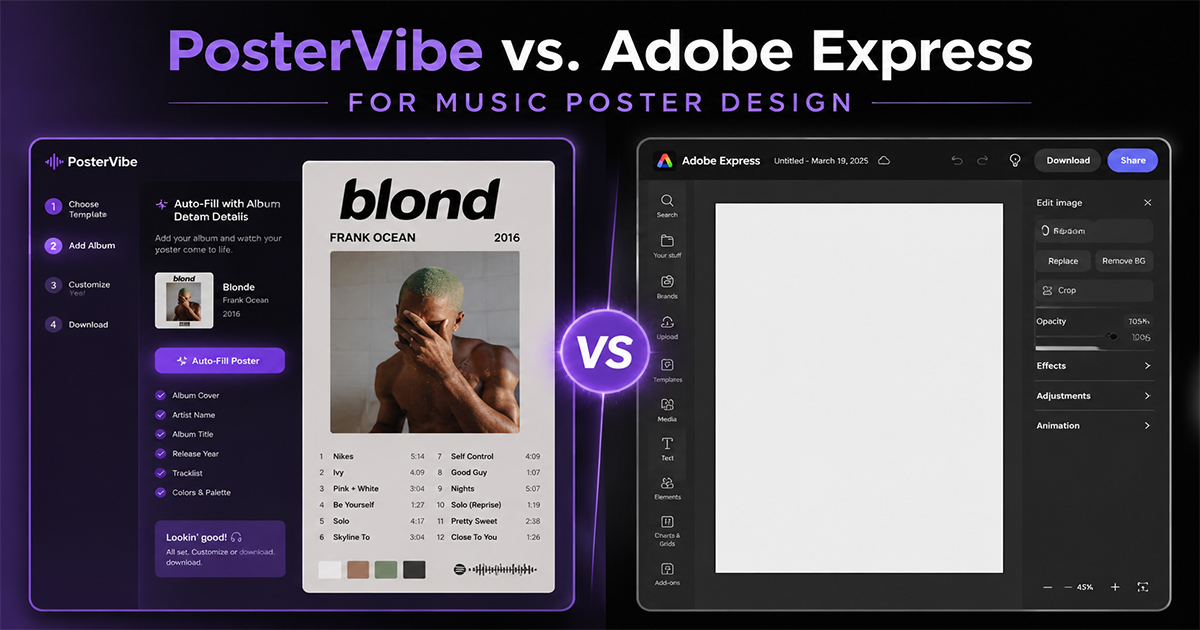
PosterVibe vs. Adobe Express for Music Poster Design
PosterVibe or Adobe Express for music poster design? We compare setup, speed, album data, templates, cost, and print output to help you choose.
Adobe Express is a slick, free-to-start design tool — a lighter, friendlier cousin of the full Creative Cloud suite. It's great for social graphics, flyers, and quick brand assets. So a fair question: if you already have Adobe Express, why use a dedicated tool like PosterVibe to make a music poster?
This is an honest comparison across the things that actually matter for album poster design: how you get started, how fast you finish, where the album data comes from, the templates, cost, and print readiness.
A Quick Overview
Adobe Express is a general-purpose design app. You start from a blank canvas or a generic template, then add and arrange every element yourself — images, text, shapes. It's flexible and covers thousands of use cases.
PosterVibe does exactly one thing: album posters. You search an album, it auto-loads the cover art, artist, title, tracklist, label, and year, you pick a template built for music, customize, and export.
The difference is focus. Adobe Express is a Swiss Army knife. PosterVibe is the right knife for one job.
1. Getting Started
Adobe Express: You search "poster" or "album," get generic templates aimed at events and ads, and have to bend one toward music. The album cover and all the text are things you supply.
Adobe Express: flexible but unguided.
PosterVibe: You type the album name. The cover and metadata appear automatically. You're looking at a near-finished poster in seconds.
Winner: PosterVibe — the music-specific starting point removes all the manual setup.
2. Album Data
This is the biggest practical gap.
Adobe Express has no concept of an "album." You manually find a high-resolution cover image, type out the artist and title, and hand-enter the full tracklist — every song, in order, spelled correctly.
PosterVibe pulls all of it from Spotify automatically: cover art, artist, album title, release date, label, and the complete tracklist. No typing, no sourcing.
Winner: PosterVibe — by a wide margin. Hand-typing a 14-track listing is exactly the tedium PosterVibe eliminates.
3. Templates
Adobe Express offers a huge library, but they're built for general design — birthday invites, sale banners, Instagram posts. Few are tuned for the specific layout language of a music poster (cover + tracklist + metadata block + color palette).
PosterVibe templates are purpose-built: minimal, dark-atmosphere, modern-bold, vintage-vinyl, and more — each designed around how album art, tracklists, and credits actually sit together.
Winner: PosterVibe for music specifically; Adobe Express for breadth across other projects.
4. Ease of Use
Adobe Express is genuinely beginner-friendly for a general tool — but "general" means more decisions: which template, which layout, where everything goes.
PosterVibe is narrower and therefore simpler. The decisions are pre-made in a sensible default; you only change what you want to.
Winner: PosterVibe for this task; Adobe Express if you also want one app for many kinds of graphics.
5. Cost
Adobe Express: A free plan exists; the Premium plan runs roughly $9.99/month for the full asset library and features.
PosterVibe:
- Free: $0 — 10 projects, 72 DPI export, no watermark
- Basic: $8.99/month — 50 projects, 150 DPI, all templates
- Pro: $16.99/month — unlimited projects, 300 DPI, CMYK, PDF
Winner: Tie / depends. For occasional posters, both have usable free tiers. For print-grade album posters, PosterVibe's Pro tier is built around exactly that output.
6. Print Readiness
Adobe Express is optimized for screen and social. Getting reliable 300 DPI, CMYK, and bleed for a print shop is possible but fiddly.
PosterVibe exports 300 DPI, CMYK, and PDF on the Pro plan — built for print from the start.
Winner: PosterVibe for print; Adobe Express is fine for screen-only.
The Verdict
| Dimension | Adobe Express | PosterVibe |
|---|---|---|
| Getting started | Manual | Automatic |
| Album data | Hand-entered | Auto from Spotify |
| Templates | General-purpose | Music-specific |
| Ease of use | Good | Simplest for this task |
| Cost | Free / ~$9.99/mo | Free / $8.99 / $16.99 |
| Print readiness | Screen-first | Print-ready (Pro) |
Use Adobe Express if you want one general tool for lots of different graphics and don't mind assembling a music poster by hand.
Use PosterVibe if you specifically want album posters done fast, with the cover art and tracklist filled in for you and clean print output at the end.
For music posters as a task, PosterVibe wins on the things that cost you time. For everything-else design, Adobe Express is the broader tool.
Make your album poster in minutes — free →
Which do you reach for? Tell us in the community.
Ready to Create Your Own?
Put these ideas into practice with our album poster maker, or explore the album cover poster maker, spotify poster maker, tracklist poster maker.