
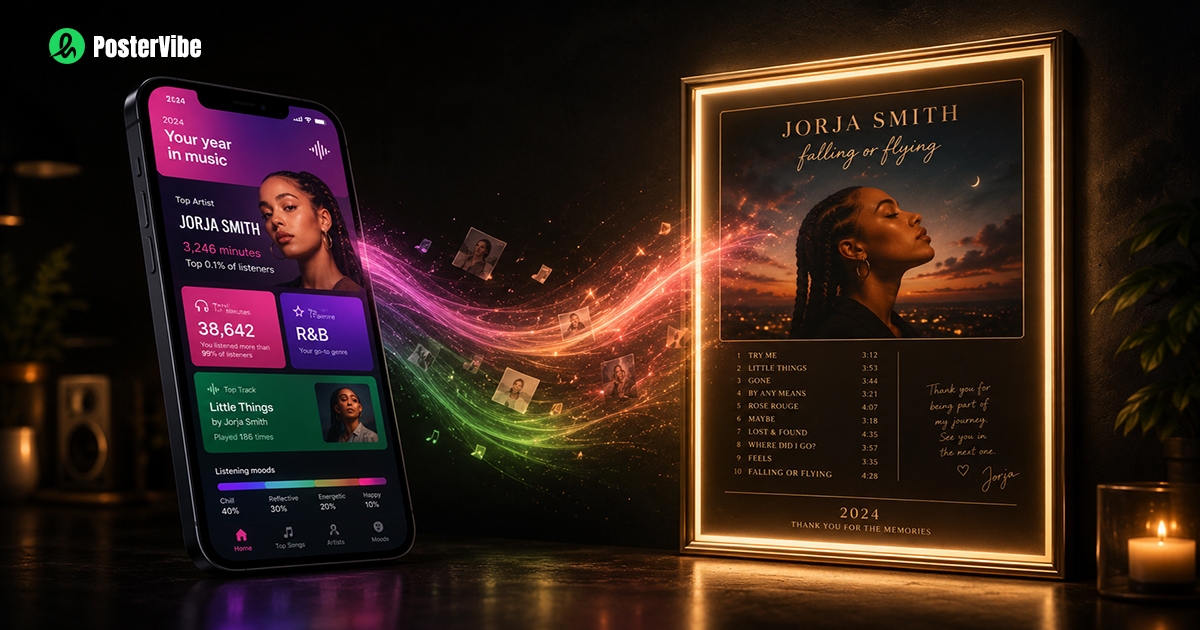
How to Turn Your Spotify Wrapped Into a Poster
Every November, Spotify Wrapped drops and the internet lights up with screenshots of top artists, listening minutes, and personality summaries. People share them to Stories, post them to Twitter, text them to friends.
And then, a week later, nobody thinks about it again.
That's a shame — because your Spotify Wrapped is actually a genuinely meaningful snapshot of your year. The albums that got you through a rough patch, the artist you discovered in March and played on repeat through summer, the songs that defined a road trip or a late night or a season of life.
That's worth more than a screenshot that disappears after 24 hours.
Here's how to turn it into something that lasts.
Why a Screenshot Isn't Enough
Spotify's Wrapped interface is designed for sharing on social media — not for lasting display. The standard screenshot has a few problems as a poster:
- Low resolution: Phone screenshots are typically 72 DPI, which prints blurry at anything larger than a postcard
- Vertical phone format: Looks odd in most frames
- Generic design: Every Spotify user's Wrapped looks roughly the same — your top artist name on a colorful gradient background
- No context: A screenshot of "Taylor Swift — 847 minutes" tells the story incompletely
A custom Wrapped poster can go much deeper: the actual album covers of your top artists, the tracklists of albums you lived in, the artists presented in a design that reflects your taste — not just Spotify's brand guidelines.
What Makes a Great Spotify Wrapped Poster
Before jumping into the how-to, it's worth thinking about what you actually want to capture. Your Wrapped poster can focus on:
Option A: Your Top Artist
A full-design poster dedicated to the artist you listened to most — their most recent album, or the one you actually played most this year. Clean, specific, personal.
Option B: Your Top 5 Albums
A collage or gallery-style layout featuring the covers of your most-played albums. Visual, easy to read at a glance, great conversation starter.
Option C: The Album That Defined Your Year
Pick one. The album you put on when you didn't know what else to play. Make it a proper poster — cover art, tracklist, label, release year, all of it.
Option D: A Listening Stats Poster
Artist names, listening minutes, top genres arranged typographically. More abstract, works well in a minimal design style.
Most people find Option A or C most satisfying — a deep, specific design rather than a broad overview.
Step-by-Step: Making Your Spotify Wrapped Poster
Step 1: Check Your Wrapped Stats
Open Spotify and navigate to your Wrapped (available each year in late November via the Spotify app or spotify.com/wrapped).
Note down:
- Your #1 top artist this year
- Your most-played album (Spotify doesn't show this directly — think about which album you actually returned to most)
- Any specific songs that defined the year for you (these appear in your Top Songs)
You don't need to screenshot anything for the poster — you just need to know which album or artist you want to feature.
Step 2: Open PosterVibe and Search Your Album
Go to postervibe.app and click Start Designing.
In the search bar, type your top artist or most-played album. PosterVibe connects directly to Spotify's database, so virtually any album — including recent releases from this year — will appear instantly.
Click on your album. In seconds, the editor loads:
- The full album cover at high resolution
- Artist name and album title
- Complete tracklist in order
- Release year, label, and additional metadata
- A color palette extracted from the cover art
Everything is ready. You haven't typed a single character.
Can't decide which album to feature? Search your top artist and browse their discography directly in PosterVibe. Click through their albums to see which one feels most "this year" to you.
Step 3: Choose a Template That Matches the Album's Mood
This is the most important creative decision in the whole process.
Browse the template library and think about the album's energy:
- Minimal White / Clean — works for introspective, lo-fi, or acoustic albums. Think soft indie, bedroom pop, classic jazz
- Dark Atmosphere — perfect for electronic, post-rock, ambient, metal, or any album with a heavy or cinematic feel
- Modern Bold — high contrast, strong typography, suits hip-hop, pop, contemporary R&B
- Vintage / Retro — warm textures and classic type, ideal for classic rock, soul, old-school hip-hop, blues
Click a template to preview it instantly with your album's actual cover art and data. The preview shows exactly what the final poster will look like.
Step 4: Customize for a Personal Touch
The template gives you a strong starting point. A few customizations can make it feel uniquely yours:
Add a personal note
Use the text tool to add a small line below the album title: "My most-played album of 2024" or "The album that got me through this year." Small, understated — but it turns a design object into a personal artifact.
Adjust the year display
If the album is older but you discovered it this year, you might want to add your own "discovered: 2024" annotation somewhere subtle in the layout.
Pick the right canvas size
- For a bedroom wall: 2:3 (fits A4, A3, A2, and standard poster frames)
- For Instagram sharing: 4:5
- For a phone wallpaper: 9:16
Try the album's color palette
PosterVibe extracts the dominant colors from your album cover. Try using these for the background — it creates a poster that feels deeply connected to the artwork.
Step 5: Export and Print
When you're happy with the design, click Export in the top toolbar.
For sharing online (Instagram, Twitter, Discord):
- Format: PNG or JPEG
- Resolution: 72 DPI
- Available on the free plan
For printing at home (A4/Letter):
- Format: PDF
- Resolution: 150 DPI (Basic plan)
For a proper wall poster (A3, A2, or 24×36):
- Format: PDF
- Resolution: 300 DPI, CMYK (Pro plan)
- Hand this file to any local or online print shop
Ideas for What to Do With Your Wrapped Poster
Frame it for your room
A simple black IKEA frame in A3 or A2 costs a few dollars and turns your poster into genuine wall art. If you change it every year, it becomes a kind of annual record — a visual diary of the music that mattered.
Gift it to someone
Know someone whose Spotify Wrapped topped out at a particular artist? Make a poster of their top album and frame it. It's one of the most personal gifts you can give a music fan — it shows you paid attention to what they actually listened to, not just what's currently popular.
Make a series
Make one poster for each year going back as far as you can remember your listening habits. Put them in matching frames on a gallery wall. Even if you don't have exact data from earlier years, you know which albums defined each year of your life.
Use it as your phone wallpaper
Export in 9:16 format and set the poster as your lock screen. Every time you pick up your phone, you see the album art. It's a small thing that makes your phone feel more personal.
Wrapped Poster Ideas by Genre
Different music tastes call for different approaches:
If your Wrapped is dominated by one artist:
Make a full retrospective poster — their biggest album, with all the details. Artist-dedicated posters feel like tributes, and they're more interesting to look at than a stats screenshot.
If your Wrapped is all over the place:
Embrace it. Make a typographic poster with just the artist names arranged in different sizes based on listening time. Minimal, personal, and requires no album choice.
If you discovered a deep-cut album this year:
The obscure find deserves the spotlight. Make a poster for the album nobody's heard of — the one you'd play for anyone who got into your car this year.
If this year's Wrapped is dominated by one emotional chapter:
The breakup album. The move-to-a-new-city album. The album that played on loop during a specific season. Make a poster of that one. You'll understand why every time you look at it, even if nobody else does.
Frequently Asked Questions
When does Spotify Wrapped come out?
Spotify Wrapped typically launches in late November or early December each year. It covers your listening from January 1 through October 31.
Can I make a Wrapped poster before Wrapped is officially released?
Yes. You already know which albums and artists you've been listening to most this year. You don't need to wait for Spotify's official release to make a poster — just design one for the album that's defined 2024 for you.
Does PosterVibe connect to my Spotify account?
PosterVibe uses Spotify's database to search albums and fetch metadata, but it doesn't access your personal listening history or require you to log in with Spotify.
Can I make posters for multiple top artists?
Yes. Make one for each of your top 5. Free accounts support up to 10 saved projects.
What size should I print my Wrapped poster?
A3 (29.7 × 42 cm) fits most standard frames and works well for a bedroom or studio. A2 makes a stronger statement. For large-format printing, export at 300 DPI to keep everything sharp.
The Takeaway
Your Spotify Wrapped is a data point. A poster is a statement.
One tells you what you listened to. The other tells you who you were — or who you were becoming — during a particular year of your life.
Music is worth that kind of attention. Take one album from this year, the one that really mattered, and make it something you'll keep looking at.
Start your Spotify Wrapped poster — free, no card required →
Ready to Create Your Own?
Put these ideas into practice with our spotify poster maker, or explore the album poster maker, album cover poster maker, tracklist poster maker.